
Selective routing for games
Smart Gaming
Choose the best route for supported games and cloud gaming services. Only your game goes through Smart Gaming; everything else stays on your normal connection.
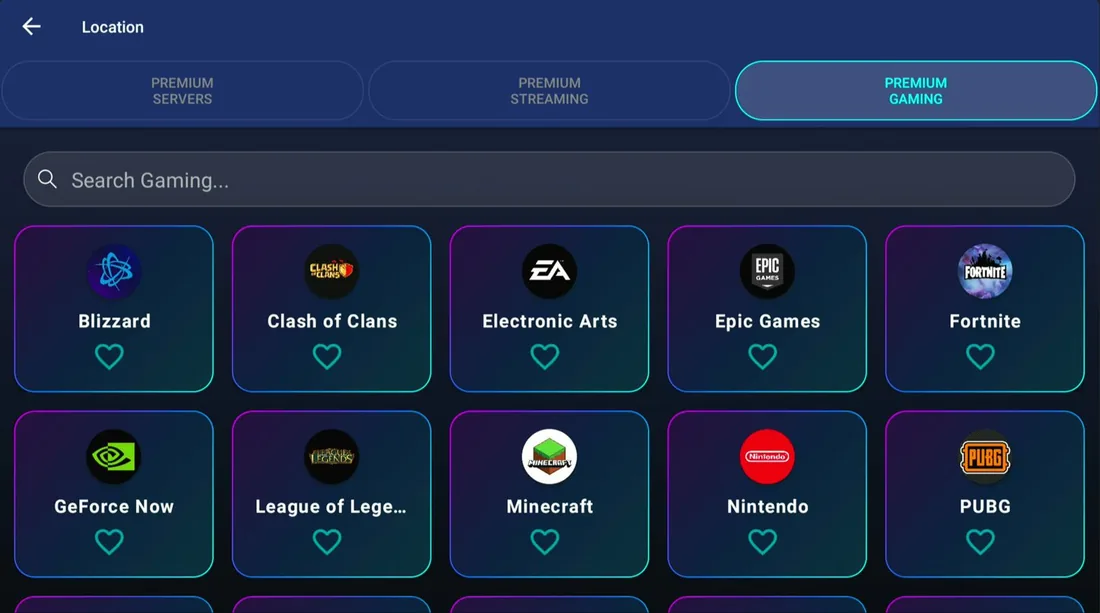
Selective routing for supported games and platforms
Minimal added latency
Designed to add as little latency as possible, because your whole device doesn't go through a VPN tunnel.
Best-route selection
Pick the country or route that works best for each supported game or cloud gaming service.
Cloud gaming ready
For supported services like Xbox Cloud Gaming and GeForce NOW, where a stable route matters most.
Local apps stay local
Your other apps keep using your normal internet connection.
Pick your game route and play
- 1
Open Smart Gaming
In the Ustreaming VPN app, go to the Smart Gaming list.
- 2
Choose your game
Select a supported game, cloud gaming service or platform.
- 3
Connect and play
Only that game uses the Smart Gaming route. Everything else stays on your normal connection.
Supported games and platforms
These are the cloud gaming services, games and platforms Smart Gaming supports; availability can vary by region and device.
Cloud gaming
 Xbox Cloud Gaming
 GeForce NOW
 PlayStation
Games
 Fortnite
 Roblox
 Minecraft
 PUBG
 League of Legends
 Clash of Clans
Platforms and publishers
 Steam
 Epic Games
 Blizzard
 EA
 Riot Games
 Rockstar Games
 Nintendo
 Meta Quest
Third-party names and logos belong to their owners and do not imply affiliation. Availability varies by service, region and device.
Can't find your game? Request it on our feedback page and our technical team will check whether it can be supported.
Request a gameReady to play?
Smart Gaming is included with Premium. Download Ustreaming VPN and open Smart Gaming in the app.
Smart Gaming questions
Does Smart Gaming add latency?
It is designed to add as little as possible, because your whole device doesn't go through a VPN tunnel. Actual performance depends on your internet provider, your region and the service.
Does Smart Gaming encrypt all my traffic?
No. It routes only the game or platform you select. When you want your whole device encrypted, use a regular VPN connection with Stealth or OpenVPN.
Will my other apps use Smart Gaming?
No. Your other apps keep using your normal internet connection.
Can I request a new game?
Yes. Send it through our feedback page and our technical team will check compatibility.